Edit, copy & link values
Touch and hold any number to modify it instantly. Tap any line to insert its value into your current step. Double-tap a line to link it—updates to the original value sync across linked lines.
A smart paper-tape calculator for iPhone and iPad, built for your entire workflow—not just the final result. Keep your calculations visible, editable, linked, and automatically saved.
Download on the App Store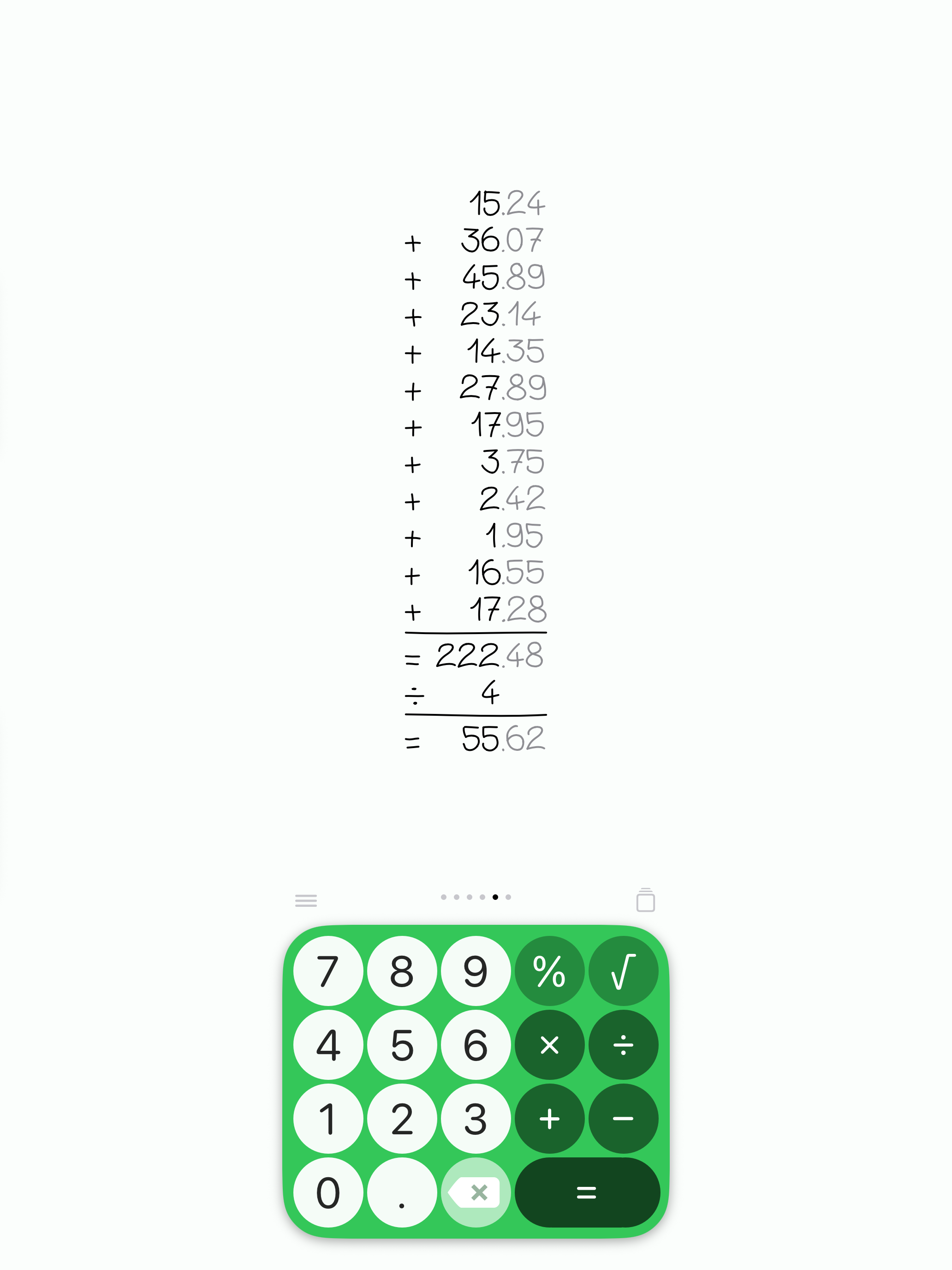
Calculus doodlus does not look like a typical digital calculator. Each calculation appears as if it were written by hand on a sheet of paper—digits in a natural handwriting style, lined up on a continuous page you can scroll and revisit.
That paper-like design is the point: you see the whole working, not only the last result. The page reads like notes you laid out yourself, which makes everyday math easier to follow, audit, and continue later.
You can go further and draw your own handwriting for the digits, so the sheet feels personal. The keyboard color is customizable too.
Input stays classic and precise: you type numbers and operators as on a traditional calculator. Operations are not sketched freehand. That choice keeps results reliable while the display stays warm and human—utility with a distinctive visual character.
Calculus doodlus is an intuitive paper-tape calculator for iPhone and iPad that keeps your entire calculation history visible, line by line. Review past entries, make edits on the fly, or build dynamic, linked calculations without starting over.
Touch and hold any number to modify it instantly. Tap any line to insert its value into your current step. Double-tap a line to link it—updates to the original value sync across linked lines.
Calculate discounts, markups, and VAT effortlessly. Every step remains clearly visible so you can audit how your final total was calculated.
Your calculation sheets are saved automatically. Pin key pages with no limit, rename sheets, share them as a polished image, or swipe between documents. Unpinned pages are limited to your 7 most recently used ones.
Ordinary calculators rely on floating-point doubles and lose precision—or switch to scientific notation—on big values. Calculus doodlus computes digit-by-digit with an arbitrary-precision engine. It can show up to 500 digits before the decimal point and 500 after, while staying exact.
Customize keyboard colors or draw your own handwriting for digits. Add widgets to your iOS Lock Screen or Control Center for one-tap launch.
Tap √, enter or paste the number under the root, then finish with an operator or =. The full step stays visible on the page.
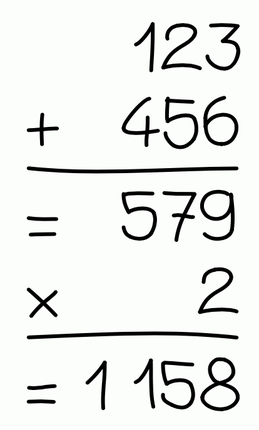
Enter a number, choose an operator, enter another number, then tap =. For example: 123 + 456 =. The result appears on the next line. Continue by choosing another operator, such as × 2 =.
When a calculation is already on the page, simply tap a number to start a new one. Previous calculations remain visible so you can refer to them or reuse their values.
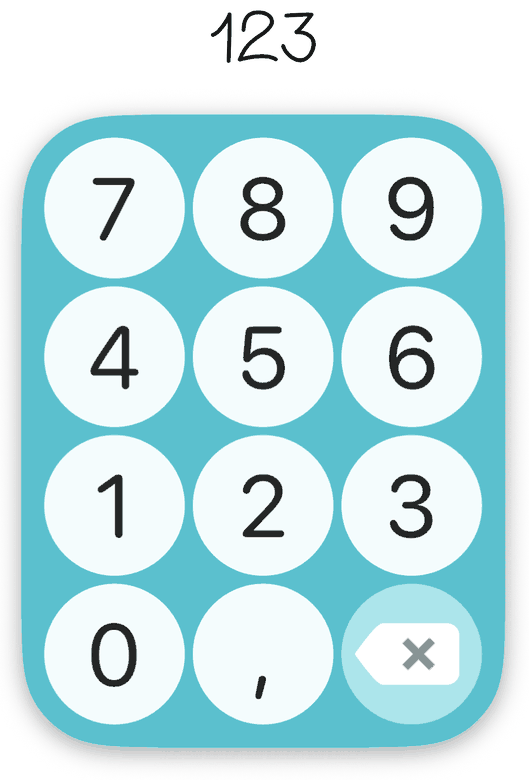
Made a mistake? You don’t need to start again. Touch and hold a number for about half a second to edit it. A mini-keypad appears so you can change its digits. Tap outside the keypad when you’re finished.
Tap a line to copy it to the bottom of the page. You can do the same with percentages. You can also choose an operator first, then tap a line to use only its number or percentage.
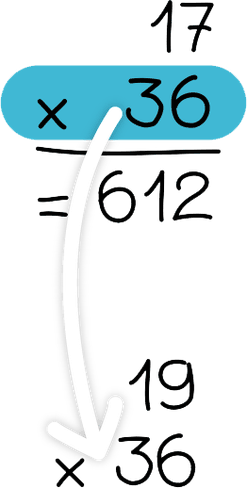
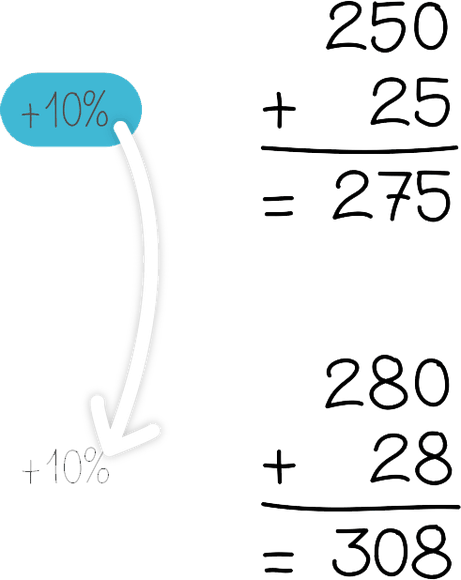
Tap a line twice quickly to copy it and create a permanent link. A link arrow appears. When the original number changes, the linked value changes too. To remove a link, tap the arrow twice.
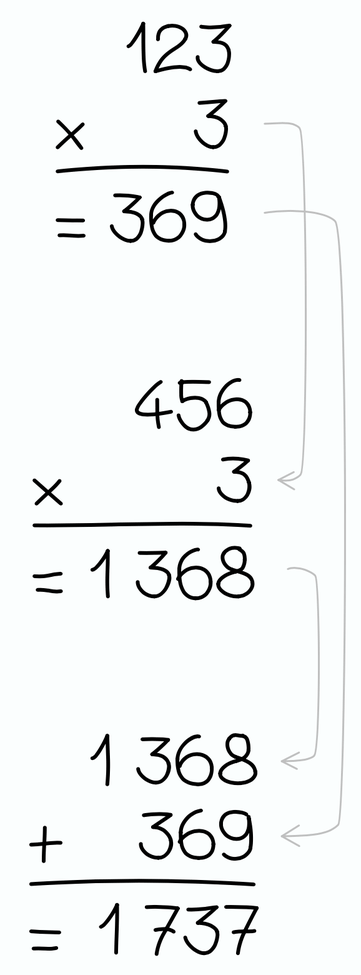
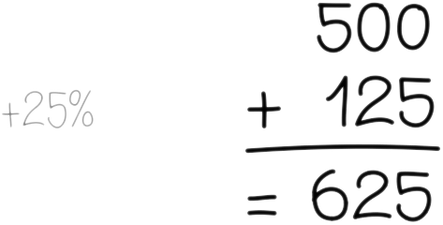
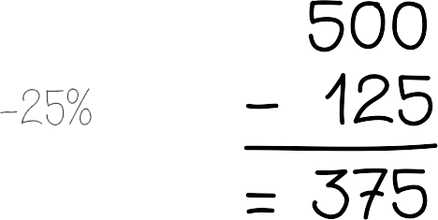
You don’t need to press = after using %. To calculate 500 plus 25%, enter 500 + 25 %. To calculate 500 minus 25%, enter 500 − 25 %.
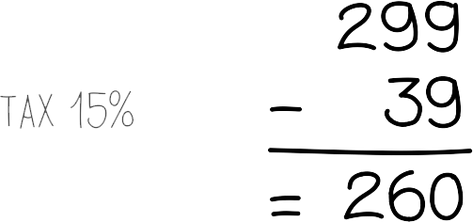
To remove VAT from a price, use ÷ together with %. For example, if a product costs €299 including 15% VAT, enter 299 ÷ 15 %.
Tap √, then enter or paste the number under the square root. Finish with an operator or =. For example: √ 529 = gives 23.

Your calculations are saved on pages. Pinned pages have no limit. Unpinned pages are limited to your 7 most recently used ones; older unpinned pages are removed automatically. Tap the Pages button to open, rename, pin, share as an image, or delete pages. Swipe left or right on the calculation page to switch sheets.

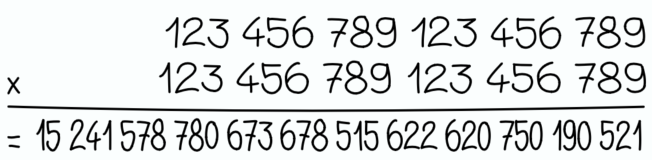
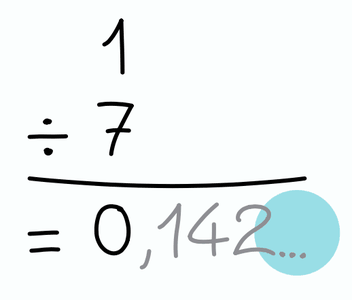
Most calculators store numbers as floating-point doubles. Beyond a modest size, digits become approximate or disappear into scientific notation. Calculus doodlus was designed differently: it performs arithmetic digit-by-digit, like on paper, with an arbitrary-precision engine. You can work with up to 500 digits before the decimal point and 500 digits after—remaining exact. When a result has many decimals, the app first shows part of it followed by …. Tap … to reveal more digits.
Use Customize the color in the menu to change the keyboard color. Choose Personalize the writing to draw your own digits with your finger. Draw slowly for better results. Tap Reset to restore the original handwriting.
Add Calculus doodlus to your Lock Screen: Touch and hold → Customize → Add the Calculus doodlus widget. On iOS 18 or later, you can also add it to Control Center via + / Customize.
Calculus doodlus is a digital paper-tape calculator for iOS and iPadOS. Unlike standard scientific or basic calculators, it displays your entire mathematical history line-by-line on a continuous virtual page, allowing you to edit past entries, link dynamic values, and save calculation sheets automatically.
Line linking lets you create dynamic dependencies between lines on the page. By double-tapping a number or result, you create a live reference. If you update the original value later, all linked calculations update automatically—like a lightweight spreadsheet on a calculator interface.
Yes. Touch and hold any number on your calculation sheet. A mini-keypad appears so you can modify the digits. Linked values that depend on that number update when the source changes.
Most everyday calculators store numbers as floating-point doubles, so very large values lose precision or switch to scientific notation. Calculus doodlus uses an arbitrary-precision arithmetic engine and computes digit-by-digit, like manual arithmetic. It can display up to 500 digits before the decimal point and 500 digits after—while remaining exact, without floating-point rounding errors.
Calculus doodlus includes percentage and VAT shortcuts. When you add or subtract a percentage, or remove VAT with ÷ and %, the entire mathematical formula remains displayed on the paper tape, so you can audit how the final total was calculated.
Yes. Every calculation is automatically stored on a dedicated page. You can swipe between sheets, pin important calculations, rename pages, share them as an image, or delete them. Pinned pages have no limit. Unpinned pages are limited to your 7 most recently used ones; older unpinned pages are removed automatically.
Pinned pages have no limit—you can keep as many important calculation sheets as you need. Unpinned pages are limited to your 7 most recently used ones; older unpinned pages are removed automatically.
Yes. From the Pages panel you can share a page as a polished image of your paper-tape sheet—ideal for sending a clear, readable calculation to someone else.
Yes. Calculus doodlus is a local calculator for iPhone and iPad: your calculation sheets stay on the device, so you can compute without an internet connection.
Yes. Calculus doodlus supports iOS Lock Screen widgets and Control Center shortcuts, enabling one-tap access to your calculator sheet from anywhere.
Yes. Calculus doodlus lets you customize keypad colors and draw your own handwriting for digits, replacing the default digit display for a personalized paper-like experience.
Calculus doodlus is designed to look like calculations written by hand on a sheet of paper. Digits appear in a handwriting style on a continuous virtual page, so each step reads like work you laid out yourself. You still type numbers and operators like a classic calculator—operations are not drawn—which keeps results precise while the display stays personal and paper-like.
The app interface is available in English, French, German, Spanish, and Italian. The numbers on the tape are international, so anyone can follow the calculations regardless of language.
Yes. Calculus doodlus is free to download on the App Store for iPhone and iPad. Optional purchases are available if you prefer to use the app without ads.
No. Calculus doodlus is built for everyday arithmetic—addition, subtraction, multiplication, division, percentages, VAT shortcuts, and square roots—with a paper-tape history. It is not a scientific calculator with advanced functions such as trigonometry or logarithms.
Unlike the built-in Calculator app, Calculus doodlus keeps every step visible on a paper-like page. You can edit past numbers, reuse and link values, save multiple pages, share a sheet as an image, and personalize digits with your own handwriting.
No. You type numbers and operators with the keypad, like a classic calculator. Only the display looks handwritten—and you can optionally draw your own digit shapes for a personal look. Operations themselves are not sketched freehand.
Tap a line to copy it to the bottom of the page. You can also choose an operator first, then tap a line to use only its number. Double-tap quickly to create a permanent link that updates when the original value changes.
Yes. Calculus doodlus is a universal app for iPhone and iPad, with the same paper-tape workflow on both devices.